


Download StockTouch – Real‑Time Stock Market Tracker for Mac, iPad & iPhone
Overview
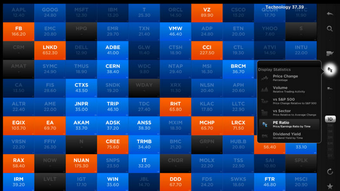
StockTouch is a sleek, Retina‑optimized stock market tracking app designed primarily for macOS but also available on iPad and iPhone. Built with investors in mind, the application transforms raw market data into vivid, interactive graphics that let you monitor price movements, trading volume, and historical trends at a glance. The interface places the most important information—live charts, price tickers, and market heat maps—in the center of the screen, while a slim control pane on the right provides quick access to watchlists, alerts, and detailed analytics.
Whether you are a day trader who needs millisecond‑level updates or a long‑term investor seeking a clear visual summary of portfolio performance, StockTouch offers a balanced mix of speed, visual fidelity, and usability. The latest update adds enhanced Retina graphics, resolves early‑load crashes, and improves window handling, making the experience smoother on both older Intel‑based Macs and newer Apple‑silicon devices. Because the app syncs seamlessly across macOS, iOS, and iPadOS, you can start a deep dive on your desktop and finish it on the go, ensuring you never miss a market swing.
In short, StockTouch is more than a ticker—it is a powerful investment tool that turns complex market data into an intuitive, actionable visual experience.
Key Features
- Real‑time market data: Live streaming quotes for thousands of global equities, indices, ETFs, and commodities.
- Retina‑grade graphics: High‑definition charts and heat maps that take full advantage of MacBook Pro, iMac, and iPad Retina displays.
- Customizable watchlists: Drag‑and‑drop stocks into personalized lists, set colour‑coded alerts, and sort by performance metrics.
- Historical analysis tools: Access 1‑day, 1‑month, 3‑month, YTD, and multi‑year price histories with overlay options for moving averages and Bollinger Bands.
- Volume and volatility indicators: Visual cues for high‑volume spikes, price volatility, and market sentiment.
- Cross‑device sync: iCloud‑based synchronization keeps your watchlists, alerts, and chart settings consistent across macOS, iOS, and iPadOS.
- Export & share: Export chart snapshots as PNG or PDF, and share directly via email or messaging apps.
- Secure data handling: Encrypted connections to major market data providers ensure that your information remains private and tamper‑free.
- Lightweight performance: Optimized code that minimizes CPU usage, preserving battery life on laptops and iPads.
Installation, Usage & Compatibility
How to download and install
To get started, visit the Mac App Store or the official StockTouch website. Click the Download button, which initiates a secure, signed installation package. The installer checks for the latest macOS version and prompts you for administrator credentials. Once installed, the app appears in your Applications folder and can be launched directly or pinned to the Dock for quick access. iPad and iPhone users simply open the App Store, search for “StockTouch,” and tap Get. The app supports automatic updates, ensuring you always have the newest features and security patches without manual intervention.
First‑time setup and navigation
Upon first launch, StockTouch guides you through a brief onboarding wizard. You’ll select your preferred market (U.S., European, Asian) and import any existing watchlists via CSV or by connecting to a brokerage account. The main dashboard loads with a default heat map, showing the biggest gainers and losers in real time. Use the right‑hand control pane to add or remove symbols, set price alerts, and switch between chart types (line, candlestick, area). The app remembers your layout, so the next time you open it, you’ll return to the exact view you left.
Operating system support
StockTouch is natively built for macOS 11 (Big Sur) and later, including full Apple‑silicon (M1, M2) compatibility. The iOS version runs on iOS 14 and later, while the iPadOS build supports iPadOS 14+. Older Mac models running macOS Catalina (10.15) can still install the app, but some Retina‑specific visual enhancements may be limited. The software is also compatible with macOS’s accessibility features, offering VoiceOver support and high‑contrast modes for users with visual impairments.
Pros, Cons & Frequently Asked Questions
Pros
- Stunning Retina graphics that make market data instantly understandable.
- Real‑time updates with minimal latency.
- Cross‑device synchronization keeps your portfolio consistent everywhere.
- Lightweight footprint – runs smoothly on both Intel and Apple‑silicon Macs.
- Secure, encrypted connections to data providers.
Cons
- Requires a paid subscription for full data access; free version is limited to delayed quotes.
- No built‑in trading execution – you must use a separate brokerage platform.
- Advanced technical analysis tools (e.g., custom indicators) are not as extensive as dedicated charting packages.
FAQ
Is StockTouch free to use?
StockTouch offers a free tier with delayed market data and basic watchlist features. To unlock real‑time quotes, advanced charts, and cross‑device sync, you need a paid subscription, which can be purchased monthly or annually.
Can I trade directly from StockTouch?
No. StockTouch is a tracking and analysis tool only. However, you can open your brokerage app directly from StockTouch by tapping the “Trade” button next to any symbol, which redirects you to your broker’s platform.
How secure is my data?
All data transmissions use industry‑standard TLS encryption. Watchlists and preferences are stored in iCloud with end‑to‑end encryption, ensuring that only you can access them.
Does StockTouch support international markets?
Yes. The app includes data for major exchanges in the United States, Canada, Europe, and Asia. You can add symbols from over 30 global exchanges to your watchlists.
What are the system requirements?
macOS 11 (Big Sur) or later, 150 MB of free disk space, and an internet connection for live data. iOS devices need iOS 14+ and at least 100 MB of storage.
After testing StockTouch for several weeks, I found it to be an exceptional visual companion for market monitoring. The Retina‑grade charts are the standout feature, turning raw numbers into a story you can read at a glance. While the lack of built‑in order execution means you’ll need a separate brokerage, the app’s ability to sync watchlists across Mac, iPad, and iPhone is a huge productivity boost. The subscription cost is reasonable given the real‑time data and polish, though power traders might miss deeper technical tools. Overall, StockTouch earns a solid 4.5 out of 5 for design, performance, and usability.
Conclusion & Call to Action
StockTouch delivers a modern, visually compelling way to stay on top of the markets, especially for Mac and iOS users who appreciate high‑resolution graphics and seamless device sync. Its real‑time data, intuitive heat maps, and customizable watchlists make it a valuable addition to any investor’s toolkit. While it isn’t a full‑service trading platform, its focus on analysis and presentation fills a niche that many generic finance apps overlook. If you’re looking for a secure, retina‑optimized stock tracker that works across your Apple ecosystem, StockTouch is well worth the investment. Download StockTouch today from the Mac App Store or the official website, start a free trial, and experience the next level of market visualization.







